Getting started
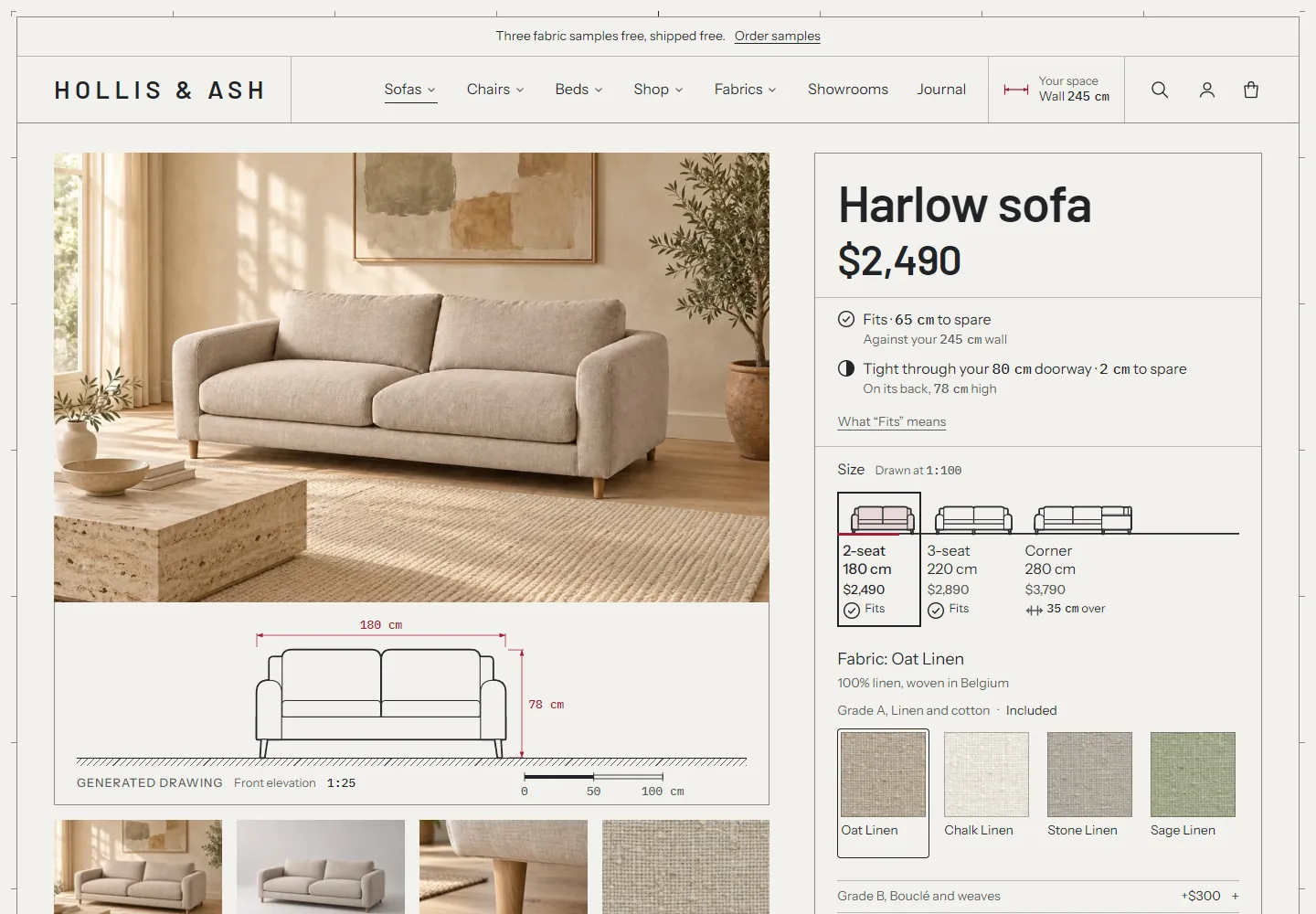
Treadle is a theme for stores that sell made-to-order furniture and lighting: sofas, beds, chairs, tables and lamps. Every page is laid out as a technical drawing sheet. The theme draws each product to true scale from its dimensions, lets shoppers save the size of their wall, room, doorway and ceiling, and tells them on every page whether a piece fits.
Around the drawings sit the made-to-order features: a fabric picker grouped by grade, photos that change with the fabric, arrival dates that follow the selected size and fabric, fabric samples in the cart and a fabric library page. All of it runs on Shopify's own metafields and metaobjects. You don't need an app.
What you need #
- A Shopify store on any plan.
- About 15 minutes to install the theme and look around.
- For the drawings and fit checks: the width, depth and height of each product, and a drawing type. See drawings.
- For the made-to-order features: time to create a few metafield and metaobject definitions in your admin. The setup overview splits this into tiers, so you can start small.
Treadle works without any of that setup. Products show standard option buttons or Shopify's own swatches, products without dimensions show no drawing, and products without a lead time show none until you set one (or a default lead time in your theme settings).
Install the theme #
- Open Treadle's listing in the Shopify Theme Store.
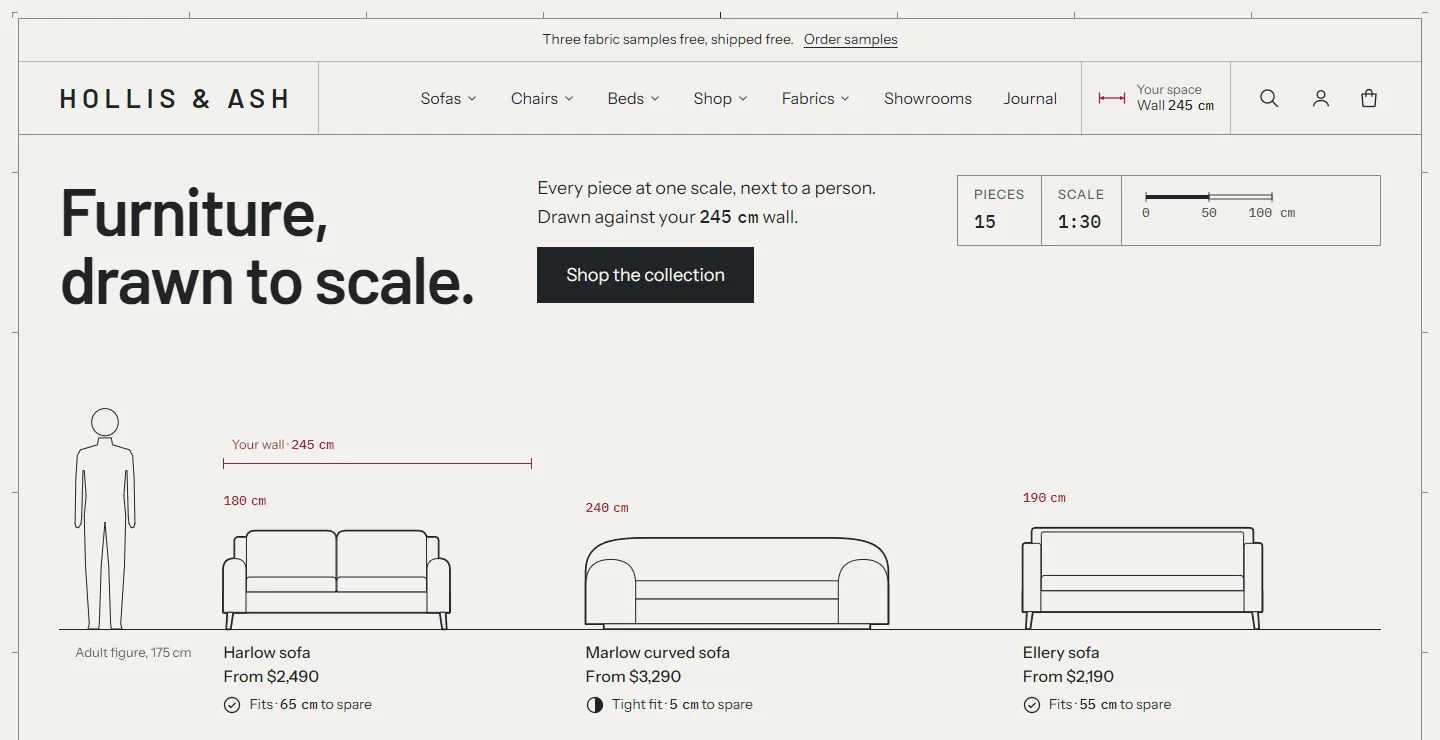
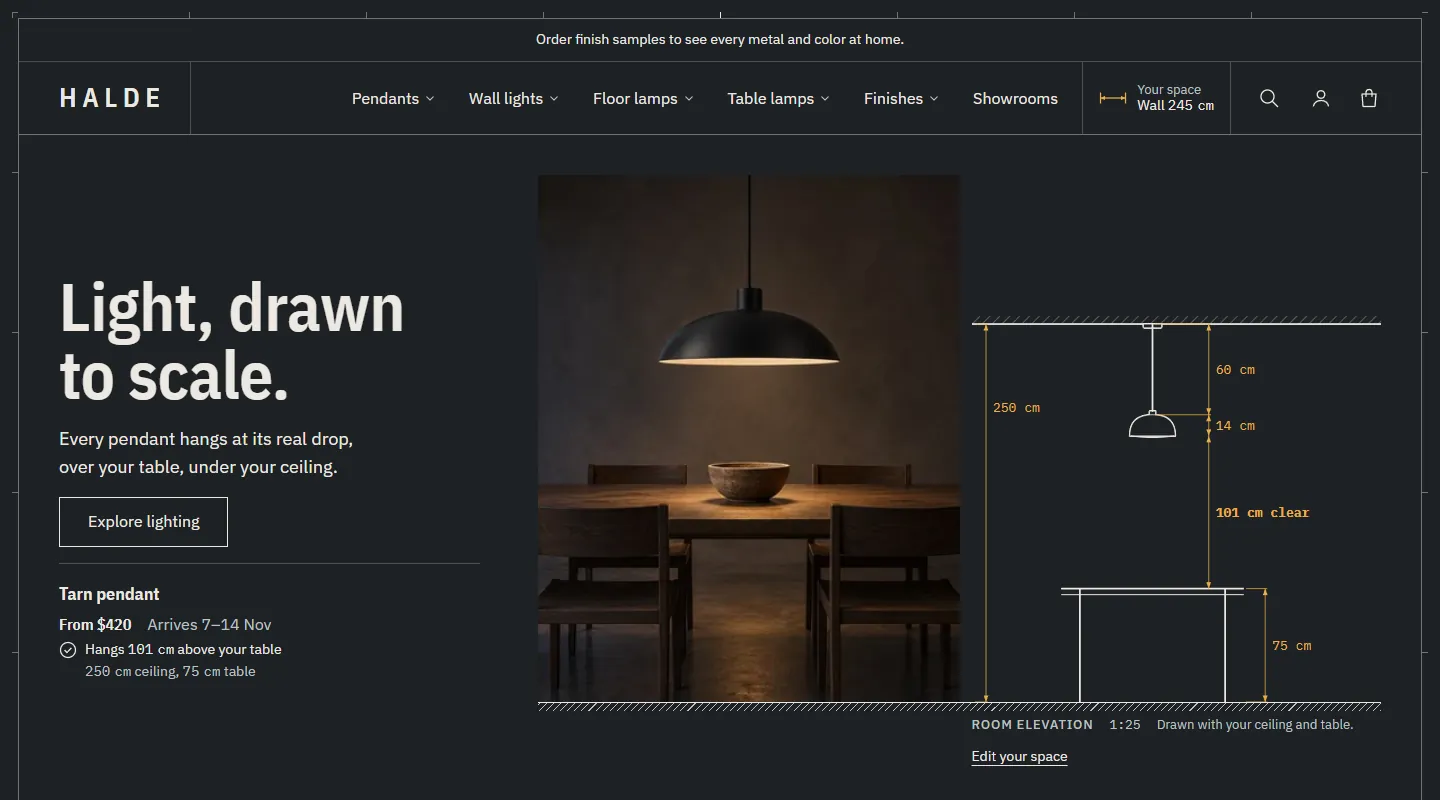
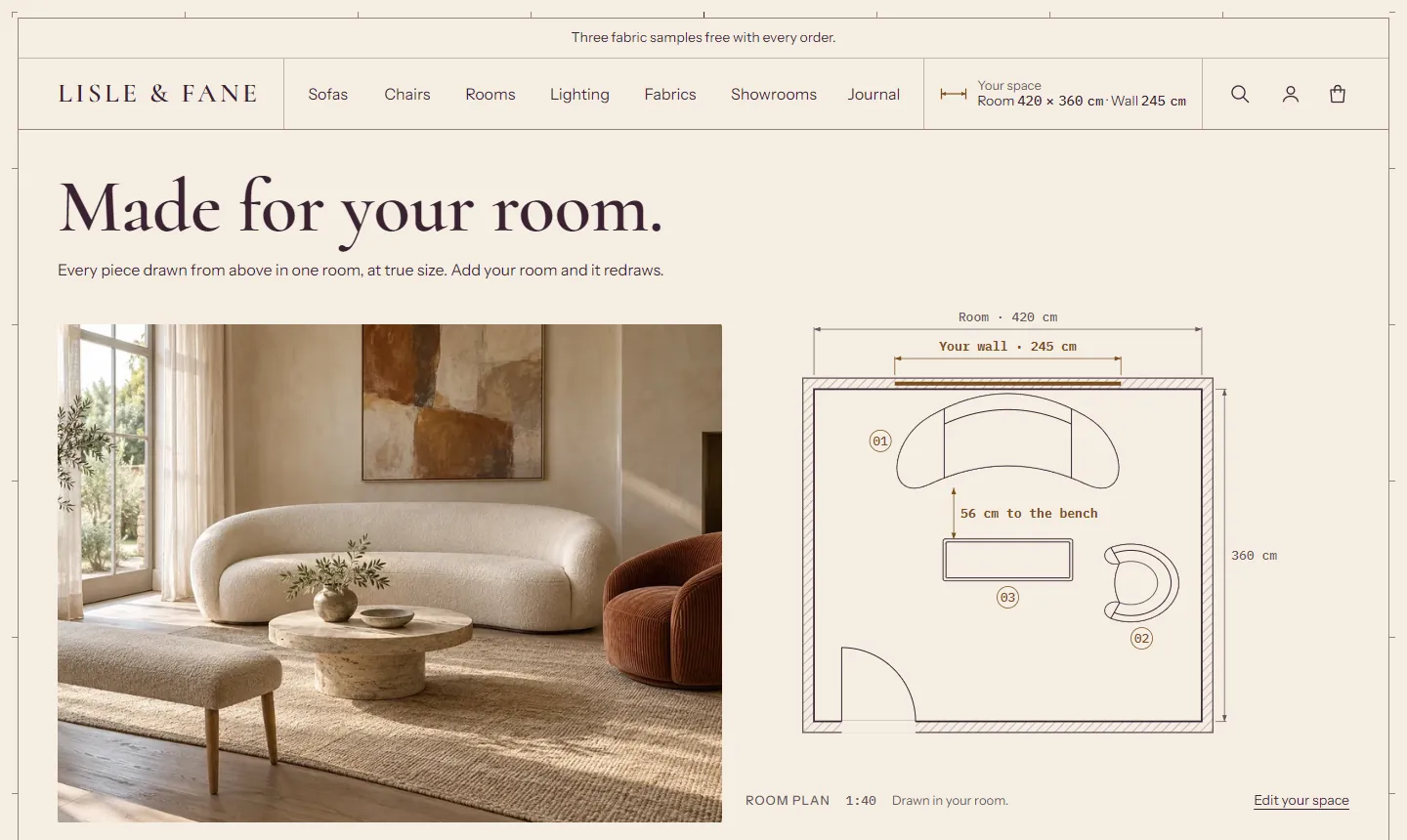
- Pick a style at the top of the listing: Treadle (the default), Graphite or Drawing Room. Each style installs its own colors, fonts and page layouts. See styles.
- Click Try theme. Shopify adds Treadle to your theme library in Online Store > Themes. Your live store doesn't change.
- Click Customize to open the theme editor and set up your store.
- When you're ready, go back to Online Store > Themes, buy the theme if you haven't, and click Publish.
Choose a style #
| Style | Look | Leads with |
|---|---|---|
| Treadle | Drafting paper, graphite ink, crimson dimensions | The whole collection drawn to scale on one floor line, next to a person |
| Graphite | Dark graphite, off-white lines, amber dimensions | A section through the shopper's room, with each pendant at its drop over the table |
| Drawing Room | Warm cream, aubergine ink, bronze dimensions | The room plan from above, with the pieces placed in one room |
Styles shows each one's pages and the settings it changes.
How the theme works #
- Drawings. Each product is drawn from its
custom.width,custom.depthandcustom.heightmetafields, shaped by its drawing type and a few shape settings (arms, legs, back, cushions). Every view states its scale. See drawings. - Your space. The chip in the header opens a panel where shoppers save their wall, room, doorway and ceiling. Fit lines then read "Fits · 20 cm to spare", "Tight fit · 5 cm to spare" or "20 cm too wide · See the 2-seater", and room views draw the piece in their room. See Your space and fit.
- The buy box is a title block: the title, rating, price, fit lines, sizes with their prices, the fabric picker, the Model, Configuration, W × D × H and Arrives fields, Add to cart, the price breakdown and the trust table.
- Arrival dates. Lead times show as dates everywhere: "Arrives 24 Nov – 8 Dec". A slower fabric grade moves the date by the weeks it adds. See lead times.
- Fabrics and samples. Swatches grouped by grade with their surcharge, a "150 fabrics for this piece" panel, free or paid samples in their own cart group, and a fabric library page. See fabrics.
Find your way around the theme editor #
- Sections are the large parts of a page, such as Lineup hero, Featured collection or Product. Add them with Add section.
- Blocks sit inside sections, such as Heading, Fit, Variant picker or Trust row. Add them with Add block.
- Theme settings apply to the whole store: colors, fonts, the drawing sheet, Your space and fit, product cards, fabrics and samples, lead times and cart.
- Use the page menu at the top of the editor to switch between the home page, a product page, a collection page and so on.
Some sections show a short note in the editor, for example "Drawings come from each product's dimensions and shape settings." The note has a Read the guide link to the matching page of these docs. Shoppers never see these notes.
Recommended order #
- Basics. Upload your logo in the Header section, set up the main menu in Online Store > Navigation, and check colors and fonts in Theme settings.
- Products and variants. Add products with options as usual. Options that change the price, such as size, fabric and leg finish, must be real variants. Keep each product at 250 variants or fewer. See variants, import and bulk editing.
- Dimensions and drawings. Create the dimension and shape definitions, fill them in, and check every product on the Shape check page. See drawings.
- Lead times. Show "Arrives 24 Nov – 8 Dec" per product, size or fabric grade. Set up lead times.
- Fabrics. The fabric picker with grades, the fabric library page and fabric samples. Set up fabrics, then samples and the fabric library page.
- Photos per fabric. The gallery changes when a shopper picks a fabric. Set up fabric galleries.
- Extras. Complete the set, reviews and lead time in order emails.
What works without setup (tier 0) #
| Feature | Where it comes from |
|---|---|
| Option buttons with price differences, such as "+$400" | Your product variants |
| Image and color swatches | Options connected to one of Shopify's category metafields, such as Color |
| The selected variant's image first in the gallery | Variant images |
| A lead time on every product page, in the cart and on the order | Theme settings > Lead times > Default lead time |
| The Your space panel, units toggle and drawing sheet frame | Built in |
| Cart drawer or cart page, order note, accelerated checkout buttons | Theme settings > Cart and the Cart section |
| Mega menu, predictive search, filters and sorting | Your menus, products and the Search and Discovery app |
Before you edit theme code #
Everything in these docs works in the theme editor and the Shopify admin, without code. If you or a developer decide to change theme files:
- Go to Online Store > Themes.
- Next to Treadle, click ... and then Duplicate.
- Edit the copy, not the live theme.
Code changes aren't covered by support, and edited files can stop theme updates from installing automatically. See the support policy.