Reviews
Treadle doesn't collect or show reviews of its own. It works with any reviews app that fills in Shopify's standard rating metafields or offers a theme app block. Two parts of the product page are ready for one:
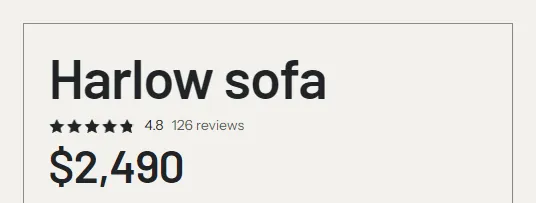
- The Rating block in the buy column: stars, the rating and "126 reviews".
- The Reviews section under the product: a holder for your app's reviews block.
Without an app, both stay hidden on your store.
Set it up #
- Install a reviews app from the Shopify App Store. Most have a free plan.
- In the theme editor, open a product page.
- Find the Reviews section under the Product section. In the theme editor it shows the note "Add your reviews app's block to this section".
- Click Add block in the Reviews section and choose your app's reviews block under Apps.
- Click Save.
The section now shows your reviews with the heading "Reviews", and the rating's review count links to it.
The Rating block #
The Rating block reads Shopify's standard review metafields, reviews.rating and reviews.rating_count. Reviews apps fill these in for you; you don't create them. A product without a rating shows nothing.
| Setting | What it does |
|---|---|
| Reviews link | Optional. Where the review count links, for example a reviews page. Leave it empty to link to the Reviews section on the same page. |
The product templates already have a Rating block under the product title. If your app has its own star rating block, you can add that instead and remove the Rating block.
Show a product's rating only with its reviews #
Theme settings > Product cards > Show a product's rating only with its reviews is on by default. With it on, the stars and count show only when the page has a reviews app block in the Reviews section, and the count links to it. A rating with no reviews behind it stays hidden, so shoppers never see stars they can't read about.
Turn it off to show the rating whenever the product has one, for example when your reviews live on a separate page and you've set the Rating block's Reviews link.
The Reviews section #
| Setting | What it does |
|---|---|
| Heading | Default "Reviews". |
| Color scheme, Top padding, Bottom padding | Section appearance. |
The section takes app blocks only. Without one it renders nothing on your store and takes no space. It's on every product template that comes with the theme. To add it to your own template, choose Add section > Reviews on a product page.
Troubleshooting #
- No stars show. Check that the product has a rating in your app, that the app writes Shopify's rating metafields (most do, sometimes behind a setting), and that the Reviews section has your app's block. Or turn off Show a product's rating only with its reviews.
- The review count isn't a link. The Reviews section has no app block, and the Rating block has no Reviews link.
- Reviews show twice. Your app added its block in two places, for example in the buy column and in the Reviews section. Remove one.