Fabric samples
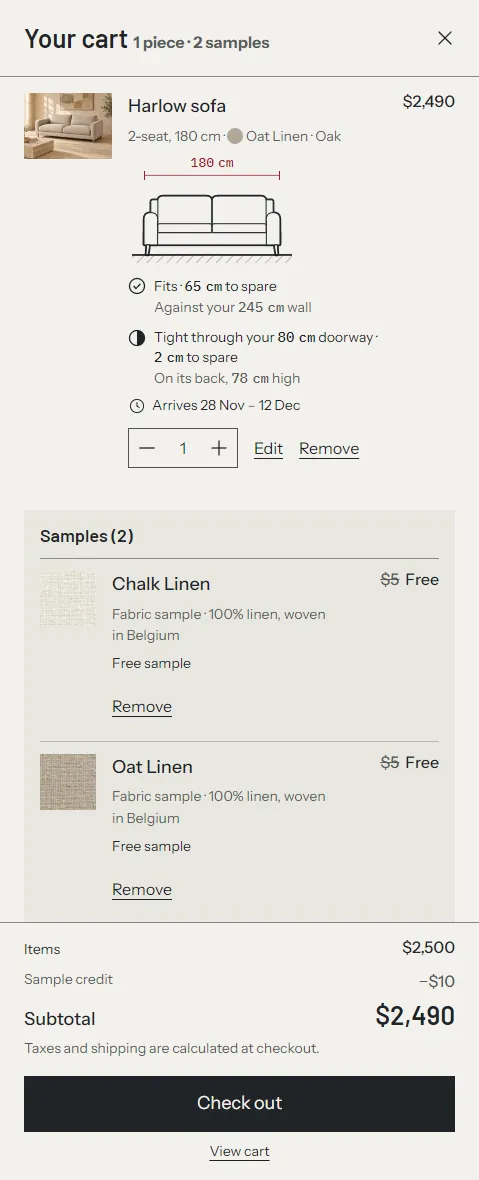
Tier 2. Shoppers can add a sample of any fabric to the cart without leaving the page. Samples sit in their own group in the cart, headed "Samples (3)", with a note you write, for example how and when samples ship.
Samples are ordinary variants of one hidden product, so they go through your normal checkout, inventory and fulfillment.
What you need first #
- Fabric entries and the
custom.fabricsdefinition from fabrics. - Products with their Fabric option linked. The sample button on the product page sits in the fabric picker, so it appears only on products that use the picker.
1. Create the sample product #
- Go to Products and click Add product.
- Title:
Fabric samples(shoppers see this on the order). - Price: the price of one sample, for example
$0.00or$4.00. See pricing below. - Add one option, named
Fabric, and link it to Fabrics (custom.fabrics) the same way as on your products: click the connect icon next to the option name and choose Fabrics. Select every fabric you offer samples of. - The Fabric option must be the product's first and only option.
- Under Shipping, keep This is a physical product on and enter a weight, for example 0.05 kg.
- Inventory: turn off Track quantity, or track it if you count your swatch stock.
- Set Status to Unlisted. Unlisted products can be bought but don't appear in collections, search or recommendations.
- Don't add the product to any collection. Click Save.
Because the option is linked to the same fabric entries, each sample variant has the fabric's exact name. When you add a fabric later, edit this product's option and select it here too.
2. Choose the product in the theme #
- In the theme editor, open Theme settings > Fabrics and samples.
- Sample product: choose Fabric samples. Sample buttons stay hidden until you do.
- Suggested samples per order: a shopping guide for customers, 1 to 20. Every style sets 3. See suggested samples per order.
- Sample note in the cart: shown under the samples in the cart, for example "Samples ship free within 3 working days." Empty by default.
- Samples are free: turn it on if an automatic discount makes your samples free (see the first N samples free). The fabric library then says "3 free samples per order" instead of "3 samples per order", and the sample buttons say "Order a free sample". A sample product priced at $0.00 counts as free without it. Off by default.
- Click Save.
The button text is a setting on each place that shows it: the Variant picker block and the Fabric library section (Button label in both). Left empty, as the templates leave it, the button says "Order a sample", or "Order a free sample" when Samples are free is on or the sample product costs $0.00. A label you write is used as it is, so don't write "free" into it if you charge for samples. To scale rows in collections have their own link, which always says "Order sample": it has no label setting and doesn't change with Samples are free.
3. Ship samples free #
Without a separate shipping profile, an order with only samples is charged your normal shipping rate. To ship samples free:
- Go to Settings > Shipping and delivery.
- Under Custom shipping rates, click Create new profile.
- Name:
Fabric samples. Click Add products and choose Fabric samples. - Click Create zone (or add your existing zones), choose the countries you ship samples to, and click Add rate.
- Rate name:
Free sample shipping. Price:$0.00. Click Done, then Save.
If a shopper orders a sofa and samples together, they pay the sofa's shipping and nothing extra for the samples.
Pricing #
All samples free #
Set the sample price to $0.00 and set up free sample shipping. The fabric library says "free samples per order" on its own, because the sample product costs nothing. An order with only samples then totals $0.00, and checkout says "Your order is free. No payment is required." The shopper still enters a shipping address.
Paid samples #
Set the price, for example $4.00. Change the button label so it doesn't say "free", and leave Samples are free off, so the fabric library says "3 samples per order".
The first N samples free #
This recipe makes, for example, the first 3 samples free and charges for more. It uses a standard automatic discount.
- Set the sample price, for example $4.00.
- Go to Discounts and click Create discount, then Amount off products.
- Method: Automatic discount. Title:
Free sample. Shoppers see the title on each sample line in the cart and at checkout. - Discount value: Fixed amount, set to the number of free samples times the sample price. For 3 samples at $4.00, enter
$12.00. - Tick Only apply discount once per order. Without it, every sample line gets $12 off.
- Applies to: Specific products, and choose Fabric samples.
- Minimum purchase requirements: none.
- Combinations: tick Order discounts and Shipping discounts if you use them. Leave Product discounts unticked.
- Set the start date and click Save.
- In the theme editor, turn on Theme settings > Fabrics and samples > Samples are free, so the fabric library says "3 free samples per order".
Result with $4.00 samples and $12.00 off once per order:
| Samples in the cart | Shopper pays |
|---|---|
| 1 | $0.00 |
| 3 | $0.00 |
| 5 | $8.00 |
| 2 samples and a sofa | The sofa only. The samples are still free. |
Shopify spreads the discount evenly over the sample lines. With 5 samples the cart shows each one at $1.60 instead of "3 free, 2 at $4". The total is correct.
How the cart shows it #
- A free sample line shows its price struck through and "Free" ("$4 → Free").
- The totals add up in three rows: "Items $2,898" (the samples at their price), "Sample credit −$8" and "Subtotal $2,890". The drawer and the cart page use the same rows.
- The drawer footer counts pieces and samples apart: "1 piece · 2 samples", and "2 free samples".
Suggested samples per order #
Theme settings > Fabrics and samples > Suggested samples per order is a shopping guide for customers, not a rule. The fabric library shows the number: "3 free samples per order" when the sample product costs $0.00 or Samples are free is on, otherwise "3 samples per order". When a shopper has that many samples in the cart, the sample buttons pause and show: "You have picked 3 samples, the suggested number per order. Remove one from your cart to choose another."
Checkout doesn't check the number. A shopper who changes their cart some other way, for example through an app or an old browser tab, can still check out with more samples. If you need a hard limit, a Shopify Function (cart and checkout validation) can enforce one. Only an app can install a Function; a theme can't.
Different names on the sample product #
If your sample product's option values don't match your fabric names (for example "Oat Linen swatch"), point each fabric at its sample: open the fabric entry in Content > Metaobjects > Fabric and choose the variant in Sample variant. Treadle uses that variant first, then falls back to matching by name. The "Order sample" links in To scale rows match by name only, so with different names they don't show.
Where sample buttons appear #
| Place | Setting |
|---|---|
| Product page, under the fabric picker | Variant picker block: Show sample buttons, Button label |
| Fabric panel ("150 fabrics for this piece", or "150 fabrics" on the sample product itself), in the preview | Same as above |
| Collections, To scale rows | "Order sample" for the row's fabric: the selected fabric of the row's variant, or the fabric in custom.shown_fabric. Shown when a sample product is set and one of its option values has that fabric's exact name. The fabric entry's Sample variant isn't used here. No setting |
| Fabric library page, in the preview | Fabric library section: Show sample buttons, Button label, Note under the button |
| Cart | Samples are grouped under "Samples (3)" with Sample note in the cart |
Troubleshooting #
- No sample buttons anywhere. Choose the product in Theme settings > Fabrics and samples > Sample product.
- No sample button on one product. That product doesn't use the fabric picker (see fabrics), or the selected fabric isn't an option value on the sample product.
- The button adds the wrong fabric. Two fabrics share a name, or the sample product's first option isn't the fabric option.
- Samples are charged shipping. The Fabric samples product isn't in a shipping profile with a $0.00 rate for the shopper's country.
- The discount doesn't apply. Check that it's active, applies to the Fabric samples product, and that Only apply discount once per order is ticked.