Shape check
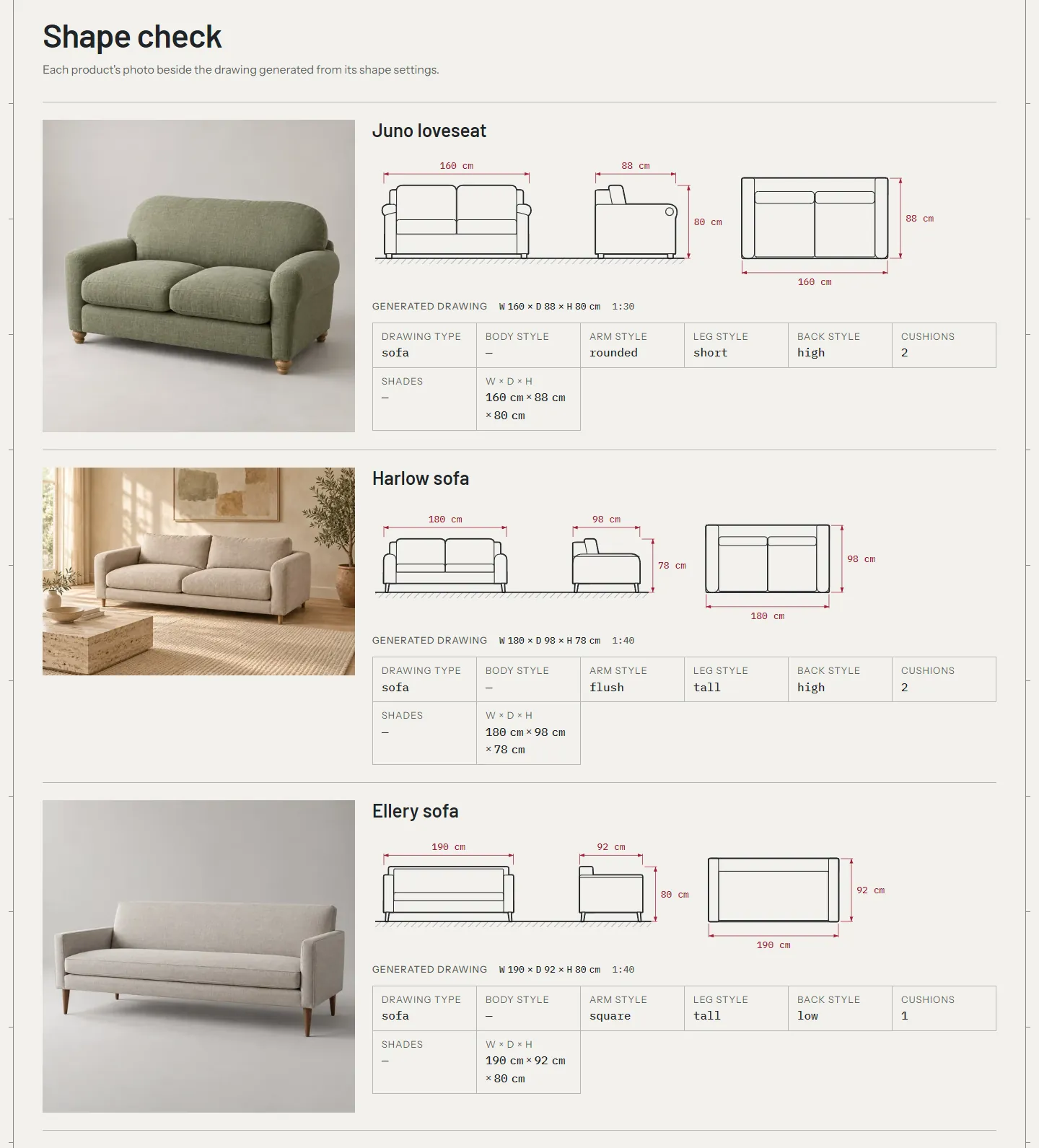
The generated drawings follow each product's shape settings, not its photo. A sofa with rolled arms in the photo and square in its settings is drawn with square arms. The Shape check page puts every product's photo beside its drawing, so you can spot the ones that disagree and fix their settings.
Use it after you set up your catalog, and again whenever you add products.
Create the page #
- In your admin, go to Online Store > Pages and click Add page.
- Title:
Shape check. Leave the content empty. - Under Theme template, choose shape-qa.
- Click Save, then View page.
Keep the page out of your menus. When you're done checking, set its Visibility to Hidden.
In the theme editor, choose Pages > shape-qa to edit the Shape check section:
| Setting | What it does |
|---|---|
| Heading, Text | The page's heading and introduction. |
| Collection | The products to check. Leave it empty to check every product in your store. |
| Products | 2 to 50. How many products the page shows. With a large catalog, check one collection at a time. |
Read the page #
Each product has one row:
- The product's main photo.
- Its generated drawing: front, side and plan, at one scale, with the dimensions.
- Its settings: drawing type, body style, arm style, leg style, back style, cushions and shades (
custom.shades, for a linear pendant), and W × D × H.
The row uses the variant the product page opens on, so a variant's own drawing type or dimensions show here. A product with no width or height says "Dimensions on request" instead of a drawing.
Compare the photo with the drawing, one part at a time:
- The outline. Is the type right? A corner sofa drawn as a straight sofa needs
sectional. A curved sofa needs the body stylecurved, a modular onemodular. - The proportions. A drawing that looks too long or too tall usually has a wrong dimension, or a dimension in the wrong unit.
- The arms. Rolled arms are
rounded, slab arms with a soft top aretrack, low thick arms in line with the base areflush, square arms aresquare. - The legs. Tapered legs are
tall, bun or block feet areshort, a base to the floor isplinth. - The back and cushions. Loose back cushions are a
highback, a tight back islow. Count the seat cushions.
Fix a drawing that doesn't match #
- Open the product in Products.
- In the Metafields card, change the setting, for example Arm style from
squaretorounded. - Click Save and reload the Shape check page.
The shape settings table says what each value draws for every type. The silhouette library shows all of them side by side.
Some details have no setting. A sloped arm, a straight drum lampshade or a plain rounded headboard can't be drawn exactly. Pick the closest value, and if the difference matters, either upload your own drawing to custom.drawing (see your own drawing) or use a photo that matches what the theme draws. For lamps and beds, check these in particular:
- A table lamp's
squareshade is drawn tapered, as an empire shade, on a turned base. - A bed with
roundedarms gets a channel-tufted headboard;squaregets a plain panel with sharp corners. - A wall light with
noneis drawn as an upward-opening cone;domeis a dome opening downward. - A pendant with several shades on one bar needs
custom.shades. The Shape check row doesn't list it, so check the drawing: it should show a bar with that many shades.
Check the variants while you're here #
The Shape check is a good moment to check how your variants behave, because a wrong setting there shows on the product page as a size or fabric that can't be chosen.
Made-to-order variants shouldn't track inventory #
Shopify marks a variant as sold out when it tracks inventory and its quantity is 0. Made-to-order pieces have no stock, so a tracked variant at 0 shows "Sold out" in the size picker and on the fabric swatches, and shoppers can't order it.
For every variant you build after the order:
- Open the product and click the variant.
- Under Inventory, turn off Track quantity. Or keep tracking and tick Continue selling when out of stock.
- Click Save.
To change many variants at once, select the products in Products, click Bulk edit, and add the Track quantity column.
Track inventory only for pieces you keep in stock, such as a ready-to-ship chair.
Combinations you don't make #
When a combination doesn't exist as a variant, the button says why instead of a price: "Not made in leather" (from the selected fabric's material) or "Not offered with Corner, 280 cm" (from the other option's value). Check that every gap is a gap on purpose. A missing variant that should exist reads the same way.
Before you launch #
The Shape check page is a tool for you. Before your store goes live, set the page's Visibility to Hidden, or delete it. Its products and settings aren't affected.
Troubleshooting #
- The page is empty. The Collection has no products, or Products is set lower than you expect.
- A product shows "Dimensions on request". It has no width or height. See drawings.
- The drawing doesn't change after I edit a setting. The variant may have its own value. A variant's
custom.drawing_typeand dimensions win over the product's. - The page is slow. It draws three views of every product. Check one collection at a time, with Products at 24 or fewer.