Your space and fit
Shoppers measure their room once. Every product page, collection, card and cart line then says whether the piece fits: "Fits · 20 cm to spare", "Tight fit · 5 cm to spare" or "20 cm too wide · See the 2-seater". The room views draw the piece in the shopper's own room.
It needs nothing from you beyond the product dimensions that the drawings use. The fit check runs in the shopper's browser, and their measurements never leave their device.
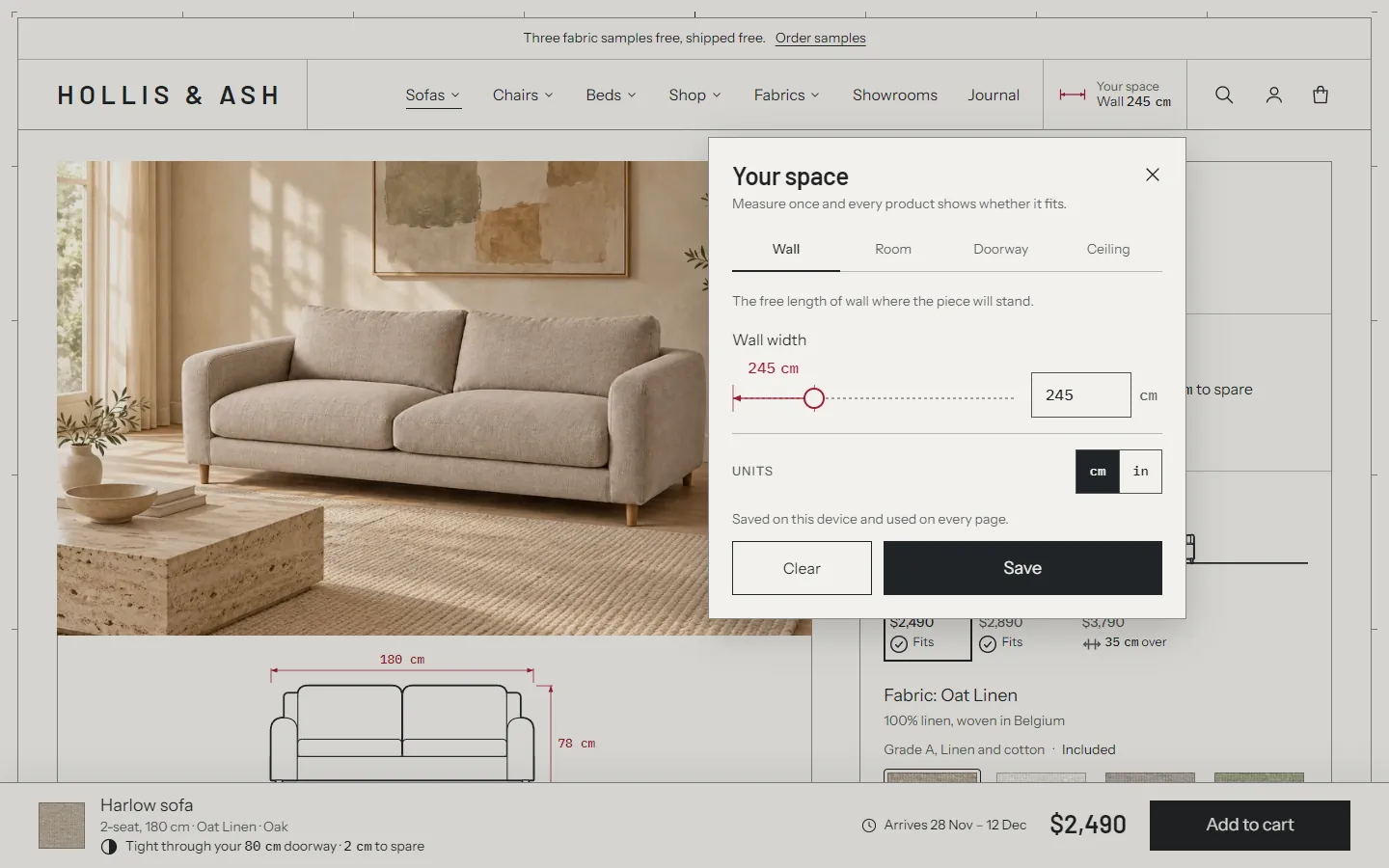
The Your space chip #
The chip sits in the header on every page and every device. It reads "Add your space" until the shopper saves something, then shows one saved value, for example "Wall 245 cm". Clicking it opens the panel.
- Theme settings > Your space and fit > Show Your space in the header turns the chip off. Shoppers can still open the panel from any "Add your space to check fit" line, the room views and the empty cart.
- Header chip shows picks the value the chip leads with: Wall, or Room. With Room, the chip reads "Room 420 × 360 cm · Wall 245 cm". Without the chosen value, the chip shows the next saved one: the wall, the room, the doorway, then the ceiling.
On phones, the chip has its own strip above the logo row. It scrolls away with the page.
The panel #
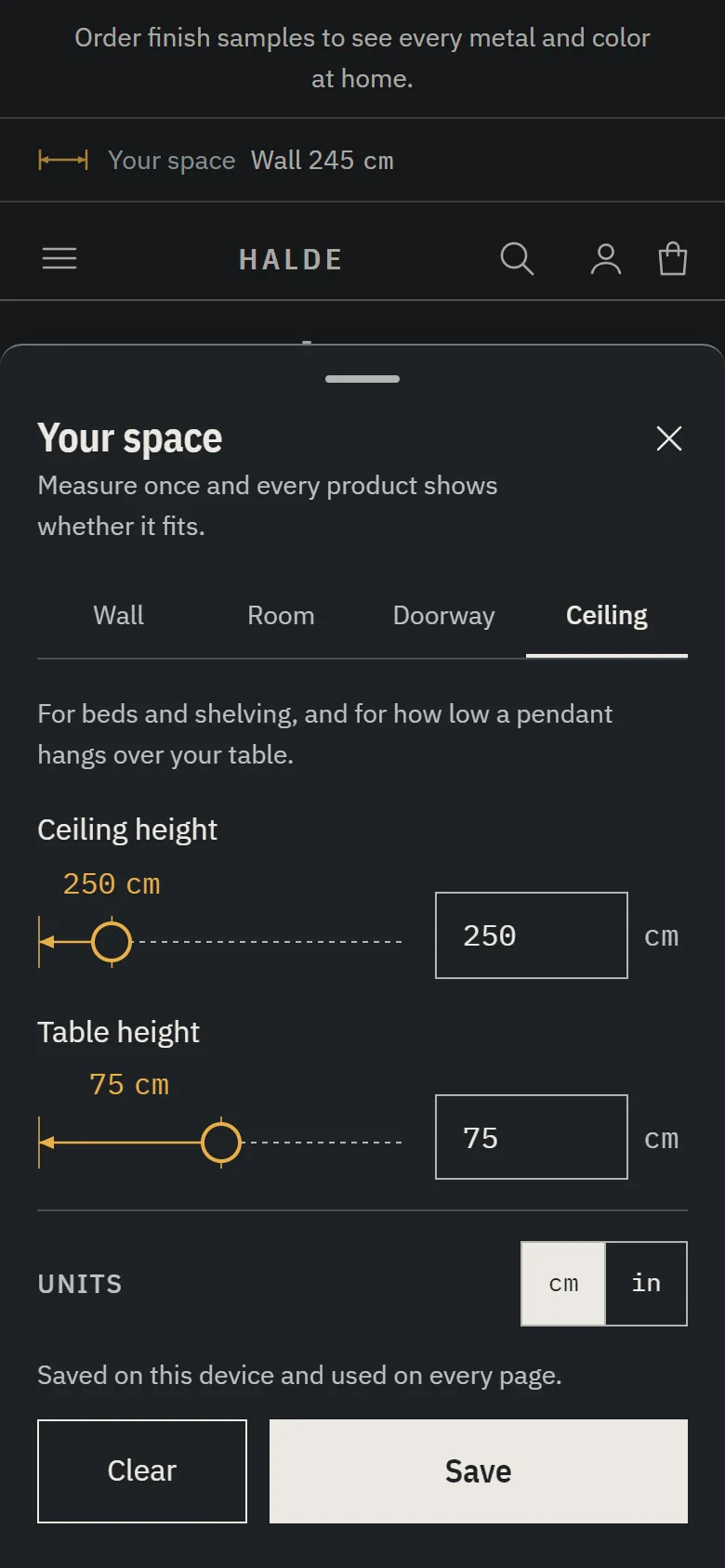
On desktop the panel opens under the chip. On phones it slides up from the bottom of the screen. It has four tabs:
| Tab | Values | Used for |
|---|---|---|
| Wall | Wall width | The free length of wall where the piece will stand. Sofas, corner sofas, chaises, sideboards and shelving are checked against it. |
| Room | Room width and depth | Corner sofas, chaises and dining tables, the room plans, and the width check when no wall is saved. |
| Doorway | Doorway width and height | The doorway check: the narrowest door or turn on the way in. |
| Ceiling | Ceiling height and table height | Beds and shelving under the ceiling, and how high a pendant hangs above the table. |
Each value has a dimension line the shopper can drag, and a number field. The line also works with the keyboard: the arrow keys move it by 1 cm (or ½ in), Shift with an arrow or Page Up and Page Down by 10, Home and End to the ends.
- Save stores the values and updates every fit line and drawing on the page. Closing the panel without saving discards the changes.
- Clear empties the saved space.
- The cm / in toggle switches every measurement on the site. It's the same toggle as in the footer's title block.
The values are stored in the shopper's browser, on that device. They're remembered on every page and in every tab, and they come back on the next visit. Nothing is sent to your store.
Fit states #
Every fit line uses one of these states, with the same wording and icon everywhere:
| State | Example | Meaning |
|---|---|---|
| Fits | "Fits · 20 cm to spare" | At least the comfortable clearance to spare. |
| Tight fit | "Tight fit · 5 cm to spare" | It fits, with less than the comfortable clearance to spare. |
| Too low | "Hangs 55 cm above your table, too low to see across it" | Pendants only: the shade hangs below Too low above a table. Its icon is an arrow down to the table. |
| Too wide, too deep, too tall | "20 cm too wide · See the 2-seater" | It doesn't fit. Shown in a neutral color, never red. |
| Empty | "Add your space to check fit" | Nothing saved yet. A button that opens the panel. |
When the shopper has saved a space but nothing in it applies to the piece, such as a wall and no ceiling for a bed, the fit line steps aside instead of asking for a space.
Comfortable clearance is a theme setting (10 cm by default). With 10 cm, a 235 cm sofa on a 245 cm wall fits, and a 240 cm sofa is tight.
When a piece is too big, the line links to a way out. It names the largest size of the same product that fits (or, if none fits, the largest tight one). Only when no size works does it name another product, and only one that fits with the full clearance. The other product comes from the product's first collection, and only if it's the same kind of piece. Turn this off with the Fit block's Suggest other products setting.
The size or product it names also has to pass the shopper's saved doorway and ceiling. A piece that arrives in parts is checked as its largest part. When nothing passes every check, the line names nothing.
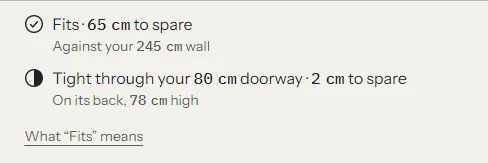
On the product page, the fit block also says what it measured against ("Against your 245 cm wall") and has a small "What "Fits" means" disclosure with the clearance and your fit disclaimer.
Short fit lines on cards, lineups and set schedules name the check on a second line when it isn't the wall: "In your 420 × 360 cm room" for a dining table, "Under your 250 cm ceiling" for a bed. A wall check keeps its one line, and so does the sticky add to cart bar.
What each type is checked against #
| Drawing type | Check |
|---|---|
| Sofa, sideboard, shelving | Width against the wall. With no wall saved, against the room width. |
| Corner sofa, chaise | Width and depth against the room, and the width against the wall too. With no room saved, the width against the wall. |
| Dining table | Width and depth against the room. |
| Bed, shelving | The height against the ceiling. A bed isn't measured against the wall. |
| Pendant | The clearance above the table at each drop. |
Envelope (generic) | No wall, room or ceiling check. Only the doorway line. |
| Bench, armchair, dining chair, stool, ottoman, side table, wall light, table lamp, floor lamp | No fit line. Cards and lineups show the piece's W × D × H in its place, and the cart shows its doorway line where it has one. |
Only the pieces that stand against a wall (sofas, corner sofas, chaises, sideboards and shelving) are measured against the saved wall, drawn against it in room views and offered "Add your wall". A bed, bench, table, chair or light gets none of these on its own.
A set or an order drawn together is different. Its first sofa, bed or cabinet is the main piece, and the drawing stands it in the saved wall with the space each side. So a bed in Complete the set, or in the cart's order drawing, is drawn against the wall, though its fit line still checks only the ceiling and the doorway.
The check uses the selected variant's dimensions. When a page has several sizes, each size in the size picker gets its own short state ("Fits", "Tight", "35 cm over"), so the shopper sees which sizes fit before choosing.
The doorway check #
With a doorway saved, every piece with a fit check also gets a doorway line, on the product page and in the cart:
- "Fits through your 80 cm doorway", with the way it goes through: "On its back, 78 cm high", "Upright, 92 cm deep" or "End on, 180 cm wide".
- "Fits through your 80 cm doorway when tilted", when it only passes by the door's diagonal.
- "Tight through your 80 cm doorway · 2 cm to spare", with at least 2 cm to spare but less than the comfortable clearance.
- "Check delivery access with us", when less than 2 cm is to spare ("Only 1 cm to spare through your 80 cm doorway. We'll plan the delivery with you.") or when it doesn't go through ("Even tilted, it needs more than your 80 cm doorway. We'll plan the delivery with you.").
Lights get no doorway line. Neither does a piece whose smallest side is under 60 cm, because it goes through any door. For a piece that arrives in parts, that's the smallest side of its largest part.
The check takes the piece's two smallest dimensions. The smaller one has to pass the doorway's width, the other its height (or, tilted, its diagonal less 5 cm). The wording stays cautious, because stairs and corners aren't measured.
Pieces that arrive in parts #
A modular sofa or a bed delivered flat goes through the door in parts. Tell the theme with two metafields, on the product or on a variant:
| Metafield | Value |
|---|---|
custom.delivery_mode | whole (the default), legs_off, modules or flat_pack |
custom.largest_module | The largest part in cm, width × depth × height, for example 105 × 105 × 70 |
With both set, the doorway check uses the largest part and says how the piece arrives: "Arrives in modules · each fits through your 80 cm doorway", "Arrives flat-packed · fits through your 80 cm doorway" or "With its legs off, fits through your 80 cm doorway". For legs_off, enter the piece's size without its legs as the largest module.
Use variant values when only some sizes arrive in parts, such as a sofa whose corner version comes in modules.
Turning it off #
Theme settings > Your space and fit > Check doorways removes every doorway line.
Pendants and the ceiling #
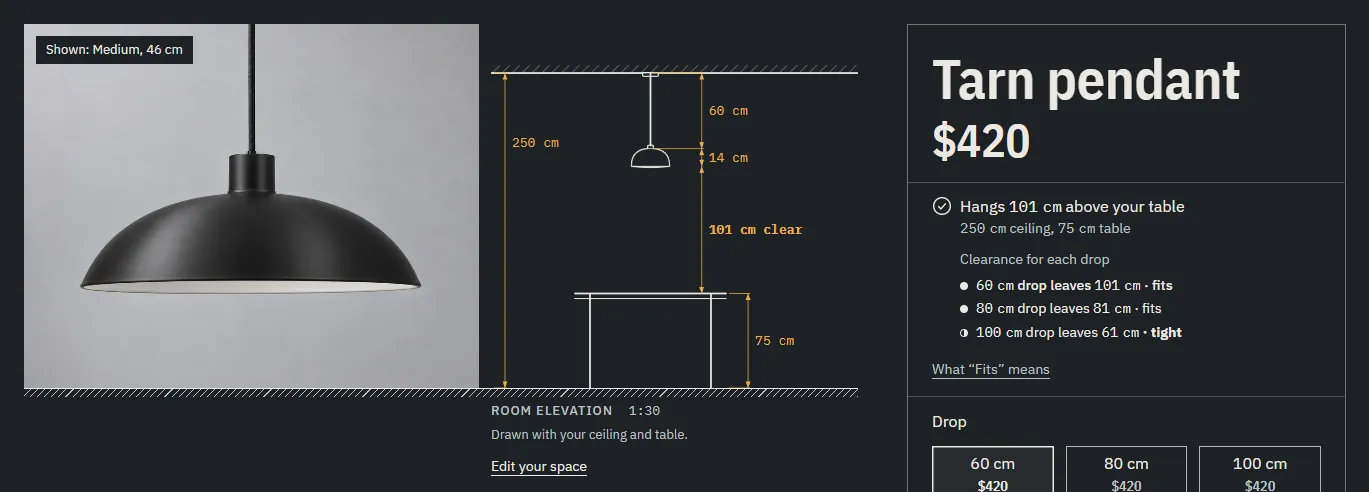
For a pendant, the theme works out the clearance above the shopper's table: ceiling height − drop − shade height − table height. It needs the ceiling and table heights from the Ceiling tab, and the pendant's custom.drop and custom.height (the shade's height).
- The line reads "Hangs 75 cm above your table".
- Below the minimum it reads "Hangs 62 cm above your table, below the recommended 65 cm" (tight).
- Below Too low above a table it reads "Hangs 55 cm above your table, too low to see across it" (too low).
- When the shade would hang into the table, it reads "Hangs lower than your table top".
- On the product page, "Clearance for each drop" lists every drop option with its state: "60 cm drop leaves 95 cm · fits", "90 cm drop leaves 62 cm · tight", "100 cm drop leaves 55 cm · too low". A drawn size says "Too low" under it.
Minimum clearance above a table sets the recommended minimum (65 cm by default, from 50 to 95 cm). Too low above a table sets where tight becomes too low (60 cm by default, from 30 to 80 cm). Keep it below the minimum; a higher value counts as the minimum.
The drop list reads the option whose values change the drop, wherever it stands in the option order. For a pendant sold in sizes and drops, it lists every drop at the selected size. A pendant without drop variants lists its sizes instead.
Room views #
Some drawings show the piece in the shopper's room. Until a shopper saves their space, they use an example room (420 × 360 cm, 250 cm ceiling, 75 cm table) and say so: "An example room. Add yours to check." Each has an "Edit your space" link.
- Room elevation: a section through the room from floor to ceiling. A sofa stands against the saved wall with the space on each side dimensioned ("32.5 cm each side"), or the overhang shaded ("35 cm over"). A bed, bench, table or chair on its own product page stands in the room with no wall dimension. A pendant hangs at its drop over a table, with the clearance dimensioned. The Product section's Drawing setting, the Room elevation section on the homepage, and Complete the set's Room elevation layout use it.
- Room plan: the room from above, with the saved wall drawn on the back wall, the piece against it, and the free space measured in front ("Clear in front · 262 cm", or "61 cm to the bench" when something stands in front). A corner sofa sits in the corner. A pendant hangs over a dashed table, captioned "Over your table · 95 cm clear". A saved doorway adds the door and its swing. The Product section's Drawing setting, the Room plan block, the Room plan section, the collection's Room plan above the photos and Complete the set's Room plan layout use it.
- Your order, drawn: the cart's pieces together, against the shopper's wall, in a room elevation or in the room plan. See Theme settings > Cart > Your order, drawn. The saved wall is measured from the order's sofa, bed or cabinet. An order of lights only has none, so it's drawn without the wall bracket. Each light is drawn once: a pendant at its drop over a table, a wall light at 160 cm, and, in the room elevation, a table lamp on a side table. In the room elevation a wall light is drawn in profile on a side wall, the first on the right wall and the next on the left. The room plan draws pendants over a table and leaves lamps and wall lights out. Several pendants hang over one table, spaced along it, and each clearance is named in a row under the plan ("Tarn pendant, over your table · 75 cm clear"). In the room plan, a second sofa or a chair that would stand in the doorway's swing, on another piece or past a wall moves to a free stretch of wall, or into the open floor.
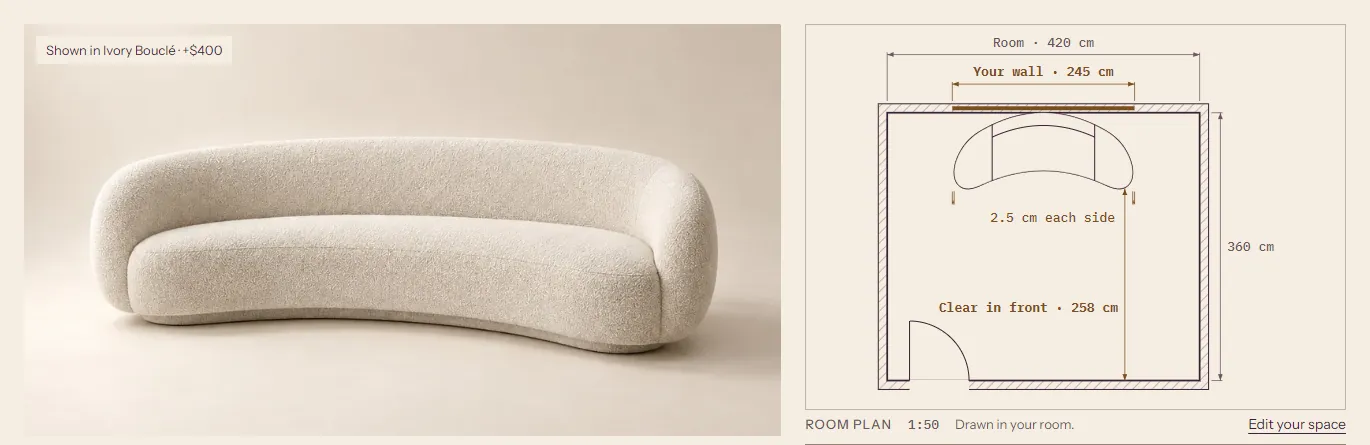
Other places that use the saved space #
- Collections, To scale view: the saved wall is a true-length bracket through every row, so long sofas visibly run past it. Without a wall, a page with a sofa, sideboard or shelving offers "Add your wall to compare".
- Lineup hero: the wall as a dimension over the first row, with "Show the shopper's wall" and Show "Add your wall" settings.
- Text blocks: the token
[space_wall]reads "Add your wall to see what fits." until a wall is saved, then "Drawn against your 245 cm wall." - Empty cart: "Fits your 245 cm wall: Juno, Harlow, Ellery. Tight: Marlow." with the pieces drawn against the wall.
- Sticky add to cart bar and the Complete the set schedules: the riskier of the wall and doorway lines, so a tight doorway shows even when the wall fits. Of two equal states, the one with less to spare shows.
Settings #
All in Theme settings > Your space and fit:
| Setting | What it does | Default |
|---|---|---|
| Show Your space in the header | The chip in the header. | On |
| Comfortable clearance | 0 to 40 cm. Fits needs at least this much spare; less reads Tight fit. The doorway uses it too. | 10 cm |
| Check doorways | Adds the doorway lines. | On |
| Minimum clearance above a table | 50 to 95 cm. Pendants warn below it. | 65 cm |
| Too low above a table | 30 to 80 cm. Below it, a pendant reads "too low". | 60 cm |
| Fit disclaimer | Shown under the fit lines on the product page. | "Guidance only. Check your own measurements before you order." |
| Header chip shows | Wall or Room. | Wall (Room in the Drawing Room style) |
The wording of the fit lines ("Fits", "Tight fit", "Check delivery access with us") is in the theme's language file. To change it, go to Online Store > Themes, click ... next to Treadle, then Edit default theme content, and search for the line.
Troubleshooting #
- A product shows no fit line. It has no width, or its drawing type has no fit check (benches, chairs, stools, side tables, lamps). Cards show its W × D × H instead.
- A bed or a bench isn't checked against the wall. Only sofas, corner sofas, chaises, sideboards and shelving are. A bed is checked against the ceiling and the doorway. In a set or order drawing, a bed that is the main piece is still drawn in the saved wall.
- A too-wide piece names no other size or product. No other size fits, or each one that does fails the saved doorway or ceiling. No other product of the same kind in its first collection fits with the full clearance and passes them too, or the Fit block's Suggest other products is off.
- A lamp or a stool has no doorway line. Lights never get one, and neither does a piece under 60 cm on its smallest side.
- The fit line says the wrong size. The line checks the selected variant. Check that each size variant has its own
custom.width. - A pendant shows no clearance. The shopper hasn't saved a ceiling and table height, or the product has no
custom.droporcustom.height. - "Clearance for each drop" lists the sizes, not the drops. The drop variants share one drop. Give each drop variant its own
custom.drop. - A modular sofa still fails the doorway. Check that
custom.delivery_modeismodulesand thatcustom.largest_modulehas three numbers, such as105 × 105 × 70.